# Introduction
The world's first hardware wallet without a seed phrase backup
Cypherock X1
Cypherock X1 is a unique hardware wallet that is BIP39 compliant and does not require any form of seed phrase backup to be maintained by the user (although you still can if you want). Cypherock's aim is to promote freedom through the self-custody of funds by building a seamless wallet experience.
The current issues with key management pose massive barriers to the adoption of decentralized technologies. We believe digital assets will have exponentially more value in the future and that will just not be limited to Cryptocurrency. Our mission is to empower people to be self-sovereign and to have the same peace of mind and control with their crypto and personal data that they have (had) with their savings in the bank vaults.
Cypherock is [open-source](https://github.com/cypherock), audited by [Keylabs](/security-overview/keylabs-third-party-security-audit), and has been scrutinized by [Wallet Scrutiny](https://walletscrutiny.com/hardware/cypherockx1/).
Cypherock is backed by industry leaders such as Consensys Mesh, Infinite Capital, Gnosis, Stefan George, Sandeep Nailwal, and many others.
# The balance between security and convenience
When it comes to building crypto wallets, there is always a tradeoff between security and convenience that drives decision-making. We at Cypherock fundamentally believe that users in web3 will have two different wallets just like how the average user today has a savings account and a checking account. The user will be using a hot wallet as a checking account for doing more frequent transactions optimizing for convenience and a hardware wallet as a savings account for keeping most of the assets and optimizing for security. Cypherock aims to be the default Crypto savings account for the user.
There are crucial wallet functions such as entropy generation, private key storage, and transaction verification that are safest when they are carried out in an offline hardware-based environment. Although hardware solutions carry out these functions in certified hardware environments, they leave a crucial element of backups exposed to human error - which renders its complexity useless. Wallet backups refer to seed phrase backups, that are usually stored on pieces of paper, or metal. Wallets backups essentially expose your private keys to prying eyes that if lost or stolen would mean the loss of your Crypto assets. In order to remove the need to back up the wallet completely, Cypherock built a state-of-the-art hardware wallet that combines Shamir's Secret Sharing and tamper-resistant hardware to break down your seed phrase into 5 Cryptographic parts such that you need any 2 but at least 2 parts to make a transaction. Hence, even if you lose any 3 Cryptographic parts, your assets are still accessible from the remaining parts.
# Cypherock X1 Hardware architecture

X1 Vault is designed with a dual-chip architecture in mind. Here STM32L4 acts as the master microcontroller and the secure element (ATECC608A) is used to authenticate the device and secure some of the encryption keys important to X1 Vault's security. The microcontroller has sufficient program memory as required to support code for various coins. The secure element used has measures to prevent various side-channel attacks. The X1 wallet has an OLED display & a 5-way joystick for user input & output.
The X1 Cards on the other hand are tamper-proof passive cards that run a Javacard OS and have a security rating of EAL6+. Our custom proprietary applet runs on top of this secure Javacard OS.
The PN532 is used to communicate between the MCU and the X1 Cards over NFC, it can also support card emulation making it able to communicate with Smartphones over NFC. We have also added a buzzer to provide feedback to the user on the tapping of cards.
Following the latest trends in consumer electronics, the wallet is enabled with a USB type C connector to connect with the desktop.
# Using ultrasonic welding for the X1 Vault enclosure
The Cypherock X1 Vault enclosure is secured using a method called ultrasonic welding. Ultrasonic welding is a process that uses high-frequency mechanical vibrations to weld or join two pieces of material together. In this process, one of the materials is held stationary while the other material is vibrated at a high frequency. The vibrations create friction and heat at the point of contact, which causes the materials to melt and fuse together.
There are three main benefits of using ultrasonic welding:
1. The process does not require the use of adhesives or other bonding agents and hence it eliminates the risk of chemical contamination or the release of harmful fumes or particles.
2. It produces welds that are free of any external protrusions.
3. Ultrasonic welding is a controlled & precise process that reduces the risk of errors or defects that could compromise the product's safety or effectiveness.
For the purposes of securing the internal components of the X1 Vault, ultrasonic welding applied to the enclosure makes it quite difficult for an attacker to take apart the device and perform any alterations that could impact the integrity of the wallet. Any modifications attempted on the wallet after the enclosure has been welded would result in scratches and damages that will be clearly visible, thereby alerting individuals of any tampering with the X1 Vault.
# Encrypted NFC communication for X1 cards
The X1 Cards interface with the X1 Vault using NFC technology. NFC not only brings convenience to the overall user experience of the Cypherock X1, but also the potential to be interoperable with interfaces such as mobile phones and POS systems. A common criticism for NFC is that it may be possible for an attacker to read and modify the information that is stored on the X1 Card.
To address the concerns of NFC communication, Cypherock has implemented end-to-end encryption in the communication between the X1 Cards and the X1 vault. This implementation makes extracting any meaningful information from the Cypherock X1 impossible.
For a detailed explanation of encrypted communication in Cypherock X1, refer to our [Github page](https://github.com/Cypherock/x1_wallet_firmware/blob/main/docs/nfc_secure_communication.md) talking about NFC secure communication.
# Using Javacards instead of MicroSD
There were a few key points that led to the usage of Javacards in comparison to SD Cards:
1. Users cannot check the genuinity of the SD card because custom logic can not be implemented.
2. MicroSD cards do not have flexible brute force prevention schemes.
3. Users can not directly communicate with phones through a MicroSD card. Javacards are NFC based and hence can directly communicate.
4. Since SD cards can not encrypt/decrypt data on its own, this inability hinders future product development and features, especially when it comes to working on crypto inheritance.
5. Javacards are battle tested for decades in the banking industry for developing credit and debit cards whereas Micro SD cards are more generally used for larger storage of non-sensitive information.
# Choosing USB vs QR Code
Since launching Cypherock X1, a lot of users requested us to support airgap operation through QR codes. Our conclusion is that air-gapped communication offers little-to-no added hardware wallet security while degrading the user experience. QR codes have similar threat models as that of USB communication. Here are some points that were considered while choosing to move forward with USB connectivity:
1. QR codes compromise a lot on UX when there are a lot of input UTXOs. For hardware wallets to make secure transactions, all of the transaction hashes of spendable outputs need to be verified in the hardware which could be in multiple kilobytes. Wallets that do not fetch this and do not verify this on the hardware are compromising on security. So QR code-based wallets will take a lot of time to transfer all of this data from the mobile app to the hardware. Whereas, this is 100 times faster through USB.
2. QR codes can be vulnerable to phishing attacks or other forms of social engineering, where an attacker tricks the user into scanning a malicious address that steals their Crypto assets. While using QR codes, the user usually does not verify the recipient's address manually.
3. Performing firmware updates with QR codes is not feasible, there will be a requirement to either connect with USB or utilize SD cards for updates - which can be cumbersome from a user experience standpoint. In some ways, if the user has to use the USB or SD card for a firmware update, that means the promise of the hardware wallet being completely air-gapped through the QR code becomes null and void.
# Why the X1 cards are not upgradeable
Upgradability allows Cypherock to improve the overall wallet experience by adding newer features and bug fixes. Cypherock has two major hardware pieces, alongside a companion software application as part of the Cypherock X1 -> the X1 Vault, 4 X1 Cards, and cySync desktop application respectively. At present, the X1 Vault code as well as the cySync desktop application code is open source and available on the [Cypherock Github](https://github.com/Cypherock) for public verifiability.
Blockchains are increasingly going to be decentralized and trustless over time. But at the end of the day, people still have to trust their wallet provider today to operate in the web3 space. There is a non-zero possibility that there is a malicious engineer working for your favourite web3 wallet that pushed a malicious software update which in turn takes away your private keys from your wallet. Here is a [potential instance](https://medium.com/@maryannechisholm_30433/i-upgraded-ledger-software-and-lost-21-btc-worth-over-600-000-73ce0069af0d) reported about the same.
As a first step towards making wallets more trustless over time, Cypherock X1 cards have been designed to be unupgradable while ensuring that your Cypherock X1 is able to support new coins and features over time. It is important to recall that the Crypto private keys of the wallet are never stored in a singular place with Cypherock X1. The keys are cryptographically split into 5 Cryptographic parts and stored physically on the X1 Vault and the 4 X1 Cards. This ensures that hypothetically even if there is a malicious developer inside Cypherock, they will never be able to compromise the X1 cards remotely giving users a much stronger security model for their Crypto assets.
# Cypherock is BIP39 compliant
To make key management compatible, most of the wallets implement hierarchical key derivation. A hierarchically derived wallet generates keys using BIP39 and BIP32 proposals in the following
fashion:
ENT--> Mnemonics--> BIP39 Seed--> Master Node--> Purpose Node--> Coin Node-> Account Node--> Change Node--> Address Index Node.
ENT stands for entropy bits and is generated using XOR of hardware-based TRNG from STM32L4 which has a NIST-compliant Deterministic Random Bit Generator (DRBG) & random nonce generated from Atecc608a secure element(FIPS 800-90 A/B/C RNG) in the X1 Vault. Its length may be chosen anywhere between 128 to 256 bits with increments of 32 bits.

CS stands for checksum and represents the first ENT/32[^1] bits of sha256(ENT). The CS bits are appended after ENT which is represented as ENT||CS. In ENT||CS each group of 11 bits represents a number between 0 to 2048 which represents a unique word in the BIP39 wordlist. The group of words represents mnemonics, also called seed phrases, which are used to recover a wallet in case a user wants to regenerate keys on a different machine.
From the above table, it could be noticed that Mnemonics and ENT are interconvertible. In Cypherock’s implementation, we apply Shamir’s secret sharing algorithm on ENT. In a standard HD wallet, different key pairs are used for every transaction, and the derivation of private keys from mnemonics is a one-way operation. Hence to make backup simple and easy we apply SSS on ENT instead of any private key. Applying SSS on ENT also enables us to derive mnemonics on reconstruction.
Shamir's Secret Sharing scheme is applied separately to each byte of the ENT and GF(256) is used as the underlying finite field. Bytes are interpreted as elements of GF(256) using polynomial representation with operations modulo the Rijndael irreducible polynomial *x*8** + *x*4** + *x*3** + *x* + 1. We apply 2 of 5 Shamir’s secret sharing algorithm where the secret byte is considered at index x= 0 and the subsequent shards are considered at indices x=1, x=2, x=3, x=4 and x=5 of the finite plane. The coefficients of polynomials are generated using the hardware-based random number generator. A user-defined password is used to symmetrically encrypt the secret byte array before transferring them to the X1 Cards. The data stored inside each X1 Card is as follows:
1. Wallet Name
2. The double hash of the password
3. Password encrypted shard
4. [MAC of the encrypted shard](#user-content-fn-2)[^2]
5. Nonce
6. Shard Index
7. SizeofENT[^3]
8. Scheme
9. Checksum of the data
We use chacha20 for encrypting the shard with the hash of the user-defined password. MAC[^4] is used to authenticate the decrypted shard. Double hash is used for password verification inside the X1 Cards. Although the X1 Card uses EAL6+ secure element, using a double hash of password for authentication and hash of the password for symmetric encryption ensures that even if the data inside the X1 Cards gets breached, getting original shard remains tremendously difficult.
[^1]: 32
[^2]: MAC and NONCE of the encrypted shard
[^3]: Size of ENT
[^4]: Poly1305 calculated MAC
# Private keys should be near to impossible to extract
Cypherock X1 consists of a decoupled architecture. Unlike other wallets, the computation happens on the X1 Vault and the storage as 5 cryptographic parts between the X1 Vault and 4 X1 Cards. The X1 Vault does not store any private keys/seed phrases as a whole permanently. It only stores the wallet names created by the user and an encrypted cryptographic part (without MAC and nonce) of each wallet in its flash memory.
Once a wallet is created (new wallet is generated from X1 or restored from an existing seed phrase) on the X1 Vault, the ENT as mentioned above is sharded, and the shards generated are sent to the X1 Cards. On the reconstruction step from the X1 Cards, the private key generated back from the threshold shards is only stored in the RAM of the X1 Vault till the time the transaction is signed or the user notes down the seed phrase. If the X1 Vault is powered off at this stage, there is no persistence of the private keys since the RAM is a volatile memory. In a static state, the X1 Vault never holds any sensitive information about the whole private keys making it worthless to attack. In the complete lifecycle of the product, never once is the private key stored as a whole in the flash memory of the generic microcontroller which makes extracting the private keys near impossible. Hence Cypherock X1 is resistant to physical attacks which are prevalent in other hardware and software wallets.
# Conflict between trusted parties should not result in unauthorized access
To prevent losses due to the conflict of trusted parties (guardians) that might be having access to the threshold number of X1 Cards (2 or more), Cypherock uses PIN protection on top of X1 Cards to securely store the cryptographic parts. The X1 cards uses the same secure hardware that is used to develop debit cards and credit cards for the banking industry.
Brute forcing an X1 Card is prevented using a time exponential algorithm which limits the subsequent access of the cryptographic part. The X1 Cards have an EAL6+ security rating. The **Evaluation Assurance Level (EAL1** through **EAL7**)**** of an IT product or system is a numerical grade assigned following the completion of a Common Criteria security evaluation, an international standard in effect since 1999.
# Using Shamir Secret Sharing vs. Multi-sig
Although multi-sig is very secure in its approach, there are drawbacks to it.
* There is no standard implementation for multi-sig for different blockchains that support it. There are different implementations done by various organizations, some of them even close-sourced. Additionally, there are risks involved with on-chain protocol changes which should ideally remain unchanged.
* In a multi-party multi-sig setup, there is a loss of privacy around funds amongst its various co-signers. So if a user has a third-party multi-sig co-signer, they can easily track the funds which paint a target on the fund’s owners.
* There is support for multi-sig by only certain number of Blockchains currently. Multi-sig is not a universal solution and needs to be implemented for every Blockchain separately which reduces standardization. Additionally, they cannot be used for securing other digital assets like the SSH keys in a similar way.
* There are higher costs associated with a multi-sig transaction as compared to a transaction done through a single key.
* There is a limit to the number of co-signers that are possible in a multi-sig setup.
* It is much more complex to change schemes. For example, if you are using a 3 of 5 multi-sig setup and one of the private keys get compromised, you have to generate a new multi-sig address with a new private key and uncompromised private keys, fetch at least 3 out of 5 devices, make a transaction to send it to the new multi-sig address and then keep them again in remote locations.
**Shamir Secret Sharing (SSS)** allows us to split a secret into n parts such that with any m-out-of-n pieces you can reconstruct the original secret, but with only m-1 pieces, no information is exposed about the secret. This allows the user to set up a safety threshold of ‘m’ number of pieces required. The original secret is decoded by the owners after reaching threshold parts using Lagrange polynomial. Method-wise it is very similar to Multi-sig, but SSS is carried out off-chain whereas Multi-sig is completely implemented on-chain. In multi-sig, different private keys contribute towards generating a multi-sig address, whereas, in SSS, a single private key is sharded into multiple parts. To balance between accessibility and security, SSS is more preferred for individuals whereas multi-sig is preferred more for enterprises.
There are some advantages of SSS which **makes it superior to multi-sig:**
* Since the computation is done off-chain, hierarchical SSS can be implemented where SSS is applied on a cryptographic part itself. This enables multi-dimensional access control which is not possible in multi-sig. Due to an off-chain implementation, there is no risk of on-chain protocol changes.
* Since SSS can be applied to any sensitive information, unlike multi-sig, standardized implementation is possible for securing any sensitive information which is not just limited to Blockchain private keys, server root keys, PGP/GPG certificates, etc.
* Unlike multi-sig, SSS is Blockchain agnostic. The BIP39 seed phrase protection using SSS solved a single point of failure with private keys and allows securing any Blockchain private keys.
* There is no loss of privacy if the co-signers do not know the public key in SSS.
* Since the transaction is still carried out by a single private key, the transaction costs are comparatively lower.
* There is no practical limit to the number of shares that can be generated using SSS.
* It is comparatively far simpler to change schemes when using SSS. For example, if you are using a 3 out of 5 SSS setup and one of the shares get compromised, you just have to generate new shares of the private key and then keep them again in remote locations. No need to make any transactions.
# How is Shamir Secret Sharing implemented within Cypherock X1
The X1 Vault implementation of SSS follows the original concepts and thus essentially is a secret sharing algorithm that operates on each byte of original data (treated as secret in the algorithm) and splits it into N number of parts of each byte.
The sharing scheme that is used in X1 Vault is (2, 5)-threshold scheme or 2-of-5 sharing scheme, wherein, any two of the cryptographic parts from the 5 generated parts can be used to retrieve the original data (or secret).
To read a complete explanation of Shamir's Secret Sharing application within Cypherock X1, navigate to Cypherock's [github page](https://github.com/Cypherock/x1_wallet_firmware/blob/main/docs/shamir_secret_sharing.md).
# Why Cypherock has a default 2/5 threshold scheme
Cypherock X1 uses a cryptographic threshold scheme called Shamir's Secret Sharing to reconstruct the private key during runtime to sign a transaction that is deleted from the temporary memory as soon as the transaction is digitally signed. Cypherock X1 currently implements 2 of 5 Shamir's Secret Sharing. Hence a user today requires either 1 X1 Card and the X1 Vault, or 2 X1 Cards to reconstruct the Crypto private keys. An average user ideally keeps 2 of the cryptographic parts at home (both in separate rooms) and the remaining 3 parts away from home.
While considering all of the schemes, here are some insights that led us to finalize the 2/5 threshold design:
1. There needs to be enough redundancy to avoid loss while protecting the user enough against the potential theft of private keys. This is where the current single-signature wallets fail and m/n threshold schemes help achieve this optimally. Human error tends to be the most prevalent reason for the loss of funds. Therefore, the 2/5 scheme created enough redundancy that the user can afford to lose cryptographic parts and still be assured that the Crypto assets are accessible. At the same time, it avoids a single point of failure for potential theft.
2. A threshold scheme of above 2/5, say, 3/5 would optimize for security but will come with a significant compromise on the wallet user experience. The 2/5 scheme avoids a single point of failure and provides exponentially more security than 1/5 and more convenience than 3/5 and above. With a 2/5 threshold scheme, the user still has the choice to keep the X1 Card and X1 Vault in the same place giving him a similar UX to current single signature hardware wallets, or keeping them as far away as possible to optimize for security.
3. It is important there isn't any single point of failure for storing the Cryptographic parts which are going to be inactive and kept as backup. In 2/5 scheme, the remaining 3 are the inactive parts. With 2/5 scheme, users have the ability to mitigate single points of failure where the user can choose to keep 1 X1 Card in a bank locker, 1 X1 Card with a family member, and 1 X1 Card with a friend. These 3 personas have 3 different risk profiles for a user and hence mitigate the risks of a single point of failure even with inactive part storage.
4. While inheriting the assets through Cypherock inheritance service (launching soon), it is important for the user to avoid a single point of failure in nominee selection. The user should be able to give two different cards to at least 2 different nominees so that even if one nominee is unavailable, the other one should be able to manage the recovery. At the bare minimum, then the average user needs to have 2 Cryptographic parts accessible to him at all times, 2 parts given to 2 different nominees and 1 additional part not easily accessible to the user and not given to any nominee as well.
At present, Cypherock is not considering offering a custom threshold scheme, but that may change in the future.
# Rejected Key Schemes
## 3-of-5 & 4-of-5 Key Scheme
In the previous section addressing the design decisions for the 2/5 scheme, human error was listed as a reasoning for the 2/5 design. Suppose that a 3/5 or above scheme was used, and cryptographic parts were lost, the risk of losing funds would increase significantly as well.
## 1-of-5 Key Scheme
The 1/5 scheme simply does not work because if one of the cryptographic parts were to be compromised, funds would be lost.
# PIN Protection on Cypherock X1
Cypherock X1 has a unique mechanism with regards to PIN protection. Cypherock uses an alphanumeric PIN system that a user can choose between 4-8 characters to add an extra layer of protection on top of each of the 4 wallets the user creates on Cypherock X1. When the PIN is generated, the hash of the PIN is created to encrypt all 5 cryptographic parts in Cypherock X1.
The double hash of the PIN is stored on each X1 Card and is used to fetch the cryptographic parts stored on the respective X1 Card. When a user enters a pin on the X1 Vault, the double hash of the PIN is calculated and sent as input to the X1 card to compare against the stored value in the X1 Card. On successful verification, the cryptographic part is retrieved from the X1 card. The X1 Vault has access to PIN (and its subsequent hash) only for the session of time in its RAM. No information about the PIN is permanently stored on the X1 Vault. Whenever a user enters a PIN it is erased right after it's used.
PIN protection on the X1 Card also comes with an exponential time function. This means that a series of wrong guesses on the PIN can lead to the wallet being locked for up to 100 years. To learn more about the locking mechanism, refer to Cypherock's [Github page](https://github.com/Cypherock/x1_wallet_firmware/blob/main/docs/cylock__proof_of_work.md) dedicated to talking about the locking mechanism with PIN protection.
# Difference between backing up your PIN vs. Seed Phrase
A seed phrase backup compromise implies an absolute loss of funds. Regardless of protections that are in place on the wallet, if an attacker at any point in time is able to compromise the seed phrase of the wallet, there are no protections against an unauthorized transfer of assets using it.
Cypherock X1 eliminates the need to backup the seed phrase, however, someone might argue that if a person forgets the PIN set on the wallet, she will not be able to recover the assets. Until Cypherock releases the inheritance service (Q3 '23), this is unfortunately true. Since Cypherock X1 is a trust minimalized product, even Cypherock does not have a recovery mechanism to recover the user's assets. We at Cypherock advise users to back up their PIN somewhere in case they feel they might forget their PIN. A PIN backup is still significantly safer than a seed phrase backup. This is because Cypherock X1 uses a 2/5 cryptographic threshold to recreate the private key. Therefore, to access functions of the wallet with PIN protection, an attacker would have to have access to the PIN, and at least 1 X1 Vault and X1 Card or 2 X1 Cards, dramatically increasing the effort required to compromise the assets secured by a Cypherock X1.
# Introduction
Security is the paramount value which Cypherock X1 was built upon. Cypherock X1 offers state-of-the-art security features that make it the ideal wallet to HODL your Crypto with peace of mind.
1. **Open-Source with Secure Elements:** Traditionally wallets had to make a choice between becoming open-source or using closed-sourced secure elements bounded by NDAs. Cypherock have the best of both Worlds. X1 Vault is open source and stores 1 of the 5 shards and the 4 X1 Cards have EAL 6+ secure elements and store the remaining 4 of the 5 shards.
2. **Distributed Entropy Generation:** Entropy in X1 Vault is generated through XOR between the random number generated by the STM32L4 chip and the ATECC chip to avoid any single point of failure in entropy generation. The user can also input their own seed phrase if they want.
3. **Server-based Security Validation:** Both X1 Vault and X1 Cards are required to be authenticated successfully through the server before the product can be used by the user. This ensures protection against supply chain attacks.
4. **Distributed Key Storage:** The master key unlike other wallets is never stored in a single place permanently in Cypherock X1. The private key for a specific coin is generated in real-time in the RAM from the X1 Vault and any X1 Card, the transaction is signed, and then the private key is deleted from the RAM then itself. It never touches permanent storage ever.
5. **PIN Protection over Key Material:** Each of the shards stored on the X1 Vault and the 4 X1 Cards is also protected by a user-generated alphanumeric PIN that has brute force protection enforced by secure elements.
# Keylabs - Third Party Security Audit
“The Cypherock X1 is an innovative wallet that uses many hardware and software security best practices and even features several security firsts that we have not yet seen in other wallets” - [Keylabs.io](https://keylabs.io/)
Keylabs is an industry leader when it comes to hardware security. Famously known for running [WALLET.FAIL](https://twitter.com/walletfail), and for their [presentation](https://youtu.be/Y1OBIGslgGM?t=1483) on discovering vulnerabilities in popular hardware wallets like Ledger & Trezor amongst others. Cypherock is proud to announce, that the X1 hardware wallet has successfully passed the security audit conducted by Keylabs, and has successfully implemented all the improvements suggested during the auditing process.
All findings and fixes recommended in the security audit have been published directly on the [Cypherock website](https://www.cypherock.com/keylabs).
Cypherock also has an active bug bounty program that you can find [here](https://www.cypherock.com/bug-bounty).
# Remote Attacks
Remote attacks include types of attacks that do not require the physical possession of Cypherock X1. A remote attacker can manipulate data sent to the hardware wallet or control a device that the wallet communicates with. For example, if the wallet connects to a computer over USB, the attacker needs to find and exploit a bug in the device’s USB software stack or application layer usage.
Remote attacks are most relevant to hardware wallets from the perspective of downloading malicious software that would lead to the loss of funds either through user-driven inputs of giving away the seed phrase or making a malicious transaction. There have been growing concerns these days whether there is a probability that the hardware wallet company pushes a malicious firmware update to the hardware to extract the private keys outs of the wallet without user's permission.
In the case of Cypherock X1, there are multiple built-in protections against malicious software interacting with the wallet -
1. **Authenticity Check:** Cypherock X1 has secure provisioning that helps ensure that the firmware, as well as the hardware of the X1 Vault, has not been tampered with. When the user initializes the product, both the X1 Vault and the X1 cards are authenticated through the Cypherock server to detect supply chain attacks on the product before the user uses it. Additionally, Cypherock has an [email authentication system](/getting-started/how-do-i-know-my-cypherock-x1-is-genuine/email-2fa-for-product-authentication) that helps users identify whether their cySync app is genuine or not as well.
2. **Seedless by design:** Cypherock X1 never exposes the seed phrase of the wallet in plain text during the initialization of the wallet, therefore, any form of phishing attacks are redundant because the user would have to navigate to operations within the wallet and access the existing seed phrase. Additionally, the product warns the user about the implications of viewing the seed phrase and giving it to someone who they might not trust hence protecting against social engineering attacks.
3. **Parts of the private key in non-upgradable hardware:** To prevent the scenario where a rogue actor from Cypherock themselves pushes a malicious firmware update, Cypherock X1 is designed such that the private keys are never permanently stored on upgradable hardware. X1 Vault is an upgradable hardware that stores 1 key shard out of the 5 and the 4 X1 Cards once shipped cannot be upgraded even by Cypherock, stores the rest of the 4 key shards each. Additionally, Cypherock is [open-source](https://github.com/cypherock) and has its software builds [reproduced by Wallet Scrutiny](https://walletscrutiny.com/hardware/cypherockx1/) to ensure that the firmware running on the hardware is same as what Cypherock claims in its open source codebase.
# Physical Attacks
Physical attacks refer to the compromise of funds by means of physical access to the wallet, or its respective seed phrase. Physical attacks are common when it comes to hardware wallets due to the attack surface from a software perspective tending to be lower than that of hot wallets.
Here are a set of physical attack vectors that a user might face while using a Crypto wallet.
1. $5 Wrench Attack
2. Pin Brute Force Attack
3. Evil Maid Attack
4. Flashing Malicious Firmware
5. Side Channel Attack
6. Supply Chain Attack
# $5 Wrench Attack
A $5 wrench attack occurs when an attacker physically threatens you using a deadly weapon to hand over your private keys or send over the funds.
Here are the steps that Cypherock has taken to protect users from this:
1. **Leveraging geographical separation of X1 cards to maximize security:** For maximum security, it is recommended to store X1 card at different locations. This increases the time required to get access to the keys and in turn increases the risk for the attacker to attack you.
2. **Creating multiple wallets within Cypherock X1:** Cypherock X1 has the ability to create and manage 4 independent wallets. A user may choose to create a wallet without pin protection which could be compromised, however, any other wallet with pin protection will not be able to compromise due to the difficulty of guessing an alphanumeric pin, and an exponential time function which has been implemented on the pin, in the case a user guesses the wrong pin.
3. **Create a passphrase to protect your crypto wallet:** Passphrases add a layer of security to your crypto wallet by requiring an extra phrase to be entered on top of the PIN protection that you may currently have set on your Cypherock X1. The passphrase combines with the existing seed phrase of your wallet to generate a brand new wallet.
# PIN Brute Force Attack
A PIN brute force attack is a type of attack that hackers can use to gain unauthorized access to a crypto wallet by guessing the correct PIN. In a PIN brute force attack, the hacker uses a computer program that automatically tries every possible combination of numbers until the correct PIN is found.
Cypherock provides users the ability to create a eight-digit alphanumeric PIN which provides a much bigger sample space compared to a numeric PIN. Even if an attacker were to be able to generate all possible PIN combinations, there are two main ways that Cypherock X1 users will be protected. Cypherock has implemented a proof-of-work lock system called the CyLock that locks the wallet for longer durations of time as more wrong attempts are made. You can learn more about Cypherock's brute force protection in detail through our [github page](https://github.com/Cypherock/x1_wallet_firmware/blob/main/docs/cylock__proof_of_work.md).
Additionally, the PIN itself is never stored on the X1 Vault. If the user has set a PIN for a wallet, the Cryptographic part is first encrypted and then stored in the NVM of the STM32. The decryption is done using the first hash of the PIN. The security of PIN is unaffected by this behavior since the nonce for encryption is stored on the X1 cards. The nonce for encryption acts as salt for the encryption along with the hash of the PIN.
# Evil Maid Attack
An evil maid attack is a type of attack that involves physically accessing a device or system to gain unauthorized access to sensitive information. The term "evil maid" comes from the idea that a hotel maid could surreptitiously gain access to a user's device while the user is away from their room, leaving the user's data at risk.
In the context of cryptography, an evil maid attack typically involves a hacker physically accessing a computer or device that has been left unattended, in order to install malicious software, replace hardware components, or extract cryptographic keys or other sensitive information. The goal of the attack is typically to gain access to encrypted data or passwords that the user has stored on the device, in the case of wallets this could mean access to the private keys of the wallet to drain funds.
There are a few approaches Cypherock has taken to mitigate the risks of the Evil Maid Attack:
1. **Using ultrasonic welding on the X1 Vault:** Ultrasonic welding makes it difficult for an attacker to physically compromise the wallet without leaving any traces of damage, thereby alerting the owner of any physical tampering. You can read more about how ultrasonic welding plays a role in X1 Vault hardware security on the dedicated page [here](/design-decisions/cypherock-x1-hardware-architecture/using-ultrasonic-welding-for-the-x1-vault-enclosure).
2. **Official firmware is signed by Cypherock's keys at the time:** Cypherock has a proprietary provisioning process that ensures the integrity of the X1 Vault. The process helps determine any changes that may have been made to the hardware, or the firmware. The provisioning process is covered in the section talking about how to verify if [Cypherock X1 is genuine](/getting-started/how-do-i-know-my-cypherock-x1-is-genuine).
3. **The Cypherock X1 avoids a single point of failure with Crypto keys:** Cypherock's architecture removes the single point of failure with private keys. This is made possible by utilizing [Shamir Secret Sharing](/design-decisions/using-shamir-secret-sharing-vs.-multi-sig/how-is-shamir-secret-sharing-implemented-within-cypherock-x1) which cryptographically splits the private key into 5 parts that are stored individually on the X1 Vault and 4 X1 Cards. Cypherock uses a cryptographic threshold of 2/5 where a user requires any 1 of the X1 Cards and the X1 Vault to make a transaction. Since each of the cryptographic parts can be secured seperately, evil maid attacks become significanlty harder.
# Flashing Malicious Firmware
A flash attack is a type of attack that targets the firmware of a crypto hardware wallet. In this attack, the attacker replaces the legitimate firmware of the device with a malicious version, which can allow them to gain access to the user's private keys and other sensitive information.
The attack typically works by exploiting vulnerabilities in the device's firmware update process. The attacker may use social engineering or other tactics to trick the user into installing a fake firmware update, or they may intercept the firmware update process and replace the legitimate firmware with their own version. Once the malicious firmware is installed on the device, the attacker can then use it to extract the user's private keys or perform other malicious actions.
There are multiple safeguards Cypherock has taken to mitigate the risks of the Evil Maid Attack:
1. X1 Vault comes with an immutable bootloader code, which is responsible for keeping track of the history of firmware versions installed on the device. Therefore, it stores information regarding the latest firmware version installed on the device. The firmware version history is protected against any factory resets that users may perform during their usage. During each firmware upgrade, the bootloader compares the firmware version of the new firmware against the last installed version. If the new version is lower than the last installed version, then the firmware update is aborted. The firmware version of the incoming firmware is checked only if the signature of the firmware header is verified.
2. The bootloader of the X1 Vault does not allow flashing unsigned firmware onto the hardware. The firmware upgrade package consists of three parts, a signed header, two signatures of the firmware binary, and the firmware binary. The firmware upgrade is incomplete until the signatures are verified with either two of the bootloader's four public keys. If any signature is unverified, the programmed binary is wiped from the flash, and the upgrade is aborted.
3. Cypherock uses a provisioning mechanism that ensures the integrity of the wallet. The provisioning process ensures that the X1 Vault and X1 Cards are authentic and untampered. To learn more about the provisioning process, read more about how to ensure that your [Cypherock X1 is authentic](/getting-started/how-do-i-know-my-cypherock-x1-is-genuine).
# Side Channel Attack
A side-channel attack is a type of attack that targets the physical implementation of a cryptographic system, such as a hardware wallet, rather than the underlying mathematical algorithms. The attack works by exploiting information that is leaked by the device through side-channels (SCA), such as power consumption, electromagnetic radiation, or timing information.
Side-channel attacks can be used to extract sensitive information, such as cryptographic keys or other secret data, from the device, even if the device itself is otherwise secure. These attacks are often difficult to detect and can be performed with relatively simple equipment, such as power analysis tools or oscilloscopes.
There are multiple layers of protection that Cypherock employs when it comes to protecting against side-channel attacks:
1. Wallet PIN verification is SCA protected as it is done inside the X1 card environment which is EAL 6+ certified. There is no PIN verification on the device.
2. X1 Vault stores only 1/5 Shamir's secret share, which is optionally encrypted with the wallet PIN if the user has set a PIN.
3. X1 Card data (including wallet's Shamir's secret share) from the X1 card is always padded with random IV generated on the card itself, and is encrypted by the pairing key, therefore, adversaries cannot reverse engineer any communication between the X1 Vault and the X1 card.
4. The private key is regenerated on the device only when a transaction is being done. The private key is wiped out from the local buffers as soon as it is no longer needed that is immediately once the transactions are signed. They are in temporary memory for a very brief period of time.
5. Time-invariant implementation of memory comparison software logic in the X1 Vault bootloader prevents any SCA vulnerabilities during the firmware boot.
# Supply Chain Attack
A supply chain attack in crypto hardware refers to a type of cyber attack where a malicious actor attempts to compromise a cryptocurrency hardware wallet or other hardware device used for storing or trading cryptocurrencies by tampering with its supply chain.
With hardware wallets, the need to have a secure supply chain system applies both to software and hardware. In reference to software, the risk factors consist of the ability of the user to verify the authenticity of the software that they are using - especially when it comes to any malware that may exist on software that is downloaded from unofficial websites. Hardware security pertains to the integrity of the chips used with the product, and the firmware that the hardware is operating on.
Cypherock has taken measures to protect users from any potential supply chain related issues. Cypherock's cySync app can be downloaded from Cypherock's [website](https://www.cypherock.com/get-started) and can also be viewed on Cypherock's [github](https://github.com/Cypherock). Additionally, Cypherock uses a secure [provisioning method](https://github.com/Cypherock/x1_wallet_firmware/blob/main/docs/device_provision_auth.md) that is used to detect any malicious changes in the hardware or firmware of the X1 Vault. Lastly, before the product can be used, both the X1 Vault and the X1 card authenticate each other to establish an end-to-end encrypted session. This will also fail in case any one of the devices or cards is not an authenticated product from Cypherock.
Before shipment, each device is provisioned with a unique set of private-public keys for device authentication and NFC card pairing. Authentication is performed by verification of signatures generated by the private key in the device. Signature verification is performed by the server using the corresponding public key.
# Eliminate messy paper backups
Crypto wallets incorporate a key system - a private and public key - used for executing and authenticating transactions and signatures. Public keys generate addresses that can be shared to receive cryptocurrencies. Private keys on the other hand serve as the password to send cryptocurrencies. Therefore, whoever owns the private key, owns whatever cryptocurrency is secured by the wallet. Private keys in their traditional form are really hard to read by humans therefore [BIP39](https://github.com/bitcoin/bips/blob/master/bip-0039.mediawiki) was introduced as a means of simplifying an otherwise random unreadable string of alphanumeric characters. BIP39 introduced the concept of seed phrases which has become commonplace now in the world of web3.
Seed phrases come in formats of either 12/18/24 words and consist of a set of random words such as:
**“clump smooth please walnut spin hotel want clump thank era neutral bleak”**
To a computer, these words are processed as the 128-bit seed:
`3494c4620c36d4f6e98c8131194fecc1681baedf073df1608b9d0ff76d46d02574b2686f39b747bb2e5dbbe522eab30084419caf49bb4a965cdccaeeac259a39`
Naturally, seed phrases are easier for humans to process and secure - if you are interested in how seed phrases are generated, you can try out this [website](https://learnmeabitcoin.com/technical/mnemonic). Please do not use any internet-connected website to generate your seed phrase, this example is given for educational purposes only. Although seed phrases became simple for individuals to understand, methods for securing seed phrases posed an immense challenge.
Most seed phrase backups come in the form of paper or metal sheets. Although popular, both forms of backups have the risk of being damaged, lost, or stolen. Most importantly, seed phrase backups today do not solve the core problem that seed phrases pose - a single point of failure. With access to the seed phrase, all funds secured by the wallet can be instantly transferred without requiring any form of authorization on the wallet itself. Therefore, a truly secure wallet system not only eliminates the problem of having a single point of failure but does not require a user to worry about seed phrases at all - essentially a seedless wallet.
Cypherock X1 is the world’s first seedless hardware wallet. When a wallet is created, Cypherock uses an algorithm called Shamir Secret Sharing to shard the private key. The private key is split into 5 shards which are stored on the X1 device and 4 X1 cards respectively. To re-derive, the private key, a threshold of 2/5 is used - any X1 card and X1 device or 2 X1 cards for example. Additionally, no one single shard can be used to derive the information on the other shard, therefore, if say one of the X1 cards is lost, the private key is still recoverable. This way, wallet shards can be distributed geographically to avoid a single point of failure with the private key. Instead of having to backup a singular seed phrase, Cypherock X1’s 5 shards become the representative of the private key thereby also eliminating the need to think about buying paper or metal backups.
# Open source with secure elements
Open-source technology has spurred innovation and has also allowed various applications to maintain security as well as garner interest from the developer community to further the technology. In the world of web3 wallets, open-source technology especially is important since verifiability around key operations is a primary concern. Although open-source software has been a boon, there are security concerns that come with a project being open-source - especially when it comes to cryptocurrency wallets, where sensitive information could be at risk.
### Security concerns
There are essentially three main risks that come with using open-source software from a security perspective:
1. Open-source software development is decentralized. This means that there is essentially no authority that is ensuring the safety of any given fork of the software.
2. Crypto wallets inherently access sensitive information, and vulnerabilities discovered in the source code can be exploited by attackers before a patch is released.
3. Electronic chips that allow the firmware to be open-source generally lack security measures that can be used to secure data stored on them.
To mitigate security risks, crypto wallets take the closed-source approach and utilize a component called a secure element that is required to generate and secure private keys. For the most part, secure elements require NDAs between the wallet company and the manufacturer of the component which restricts wallet companies from making their wallet code open-source. However, the risk of closed source systems is also valid, where the company could be privy to a zero-day attack. So, how can a system be open-source, but also be highly secure?
### Cypherock: open source, but secure?
Cypherock X1 has a unique architecture when it comes to managing private keys because, unlike other wallets, the private key does not suffer from a single point of failure. Cypherock uses an algorithm called Shamir Secret Sharing that splits the private key upon wallet creation into 5 cryptographic parts, which are independently stored on 5 hardware components - the X1 Vault and 4 X1 cards. Each individual component has a secure element, but their nature in regard to NDAs is different. The X1 Vault utilizes a secure element called ATECC608A which does not require NDAs to be signed by Cypherock whereas, the X1 cards possess an EAL6+ secure element which does require NDAs to be signed by Cypherock but is significantly proven to be more secure than ATECC608A.
The advantage of this architecture is that Cypherock can make the X1 Vault code open for review while keeping the code for the X1 cards proprietary. Making the X1 Vault open source ensures that anyone can verify the wallet operations performed with the private keys while ensuring that 4 out of 5 parts are stored securely on the 4 X1 cards which have EAL 6+ secure elements. Hence, any associated risks of being open source become futile for the Crypto private keys secured through Cypherock. Since the private keys are split into the X1 Vault alongside the X1 cards, keeping the X1 card code proprietary, and not upgradeable helps Cypherock be open source, as well as secure.
# Use Cypherock as a seed phrase vault
Cypherock X1 has the capability of securing 4 wallets - each with a separate seed phrase with the possibility to secure them with different PIN. Consider this example, a user has two wallets: a software wallet and a hardware wallet. This user has two seed phrases, that are required to be backed up. The individual can import the seed phrase of their existing wallets into Cypherock X1, and use Cypherock as a seed phrase vault. You can read more about it here -
### Step 1: Create Wallet
Plug in the Cypherock X1 Vault to your computer and choose the “Create Wallet” option on the X1 Vault.
### Step 2: Restore from Seed Phrase
Right-click on the joystick to navigate to “Restore From Seedphrase” option.
### Step 3: Create name for wallet
Set a name for your wallet. This name will also reflect on CySync once you have synced the wallet with CySync.
### Step 4: Set-up Pin
You will be prompted with an option to set the pin. For the utmost security, it is best to set a pin.
Additionally, you will be prompted with a warning that if you forget your pin, you will never be able to access the wallet. It is better to backup the PIN somewhere in case you feel you might forget it later. Even though the pin may be exposed, in the case of an attack, the attacker will still need to gain physical access to 2 physical components.
### Step 5: Choose the length of your seed phrase
Depending on the wallet that you are securing with Cypherock you may have a 12/18/24 word seed phrase. You will have the option of choosing the length of the seed phrase to input into the X1 Vault.
### Step 6: Add your seed phrase
Depending on how long your seed phrase is, you will have to input your seed phrase into the X1 device. You will be prompted with the initial two letters of the word after which you can make the selection of the word.
Why is this possible? BIP39 uses a standard set of words that allow you to generate seed phrases. Please read [here](https://github.com/bitcoin/bips/blob/master/bip-0039/english.txt) for the full list of words in the BIP39 standard.
### Step 7: Verify seed phrase
You will be prompted by the X1 device to verify your seed phrase. Please ensure that the words that are selected are accurate to your current seed phrase backup, and are in order.
### Step 8: Tap X1 cards to sync wallet
Please ensure that you have all 4 X1 cards available to complete the wallet setup. After verifying that your seed phrase is accurate, tap all 4 X1 cards with your X1 device.
### Step 9: Destroy seed phrase backup
Once you have verified that the wallet has been secured by Cypherock X1, you may now destroy your current seed phrase backup.
In the case that you want to view your seed phrase at any point in time in the future, you may do so from the wallet menu within the device under the section “View Seed”
# All-in-one Portfolio Manager
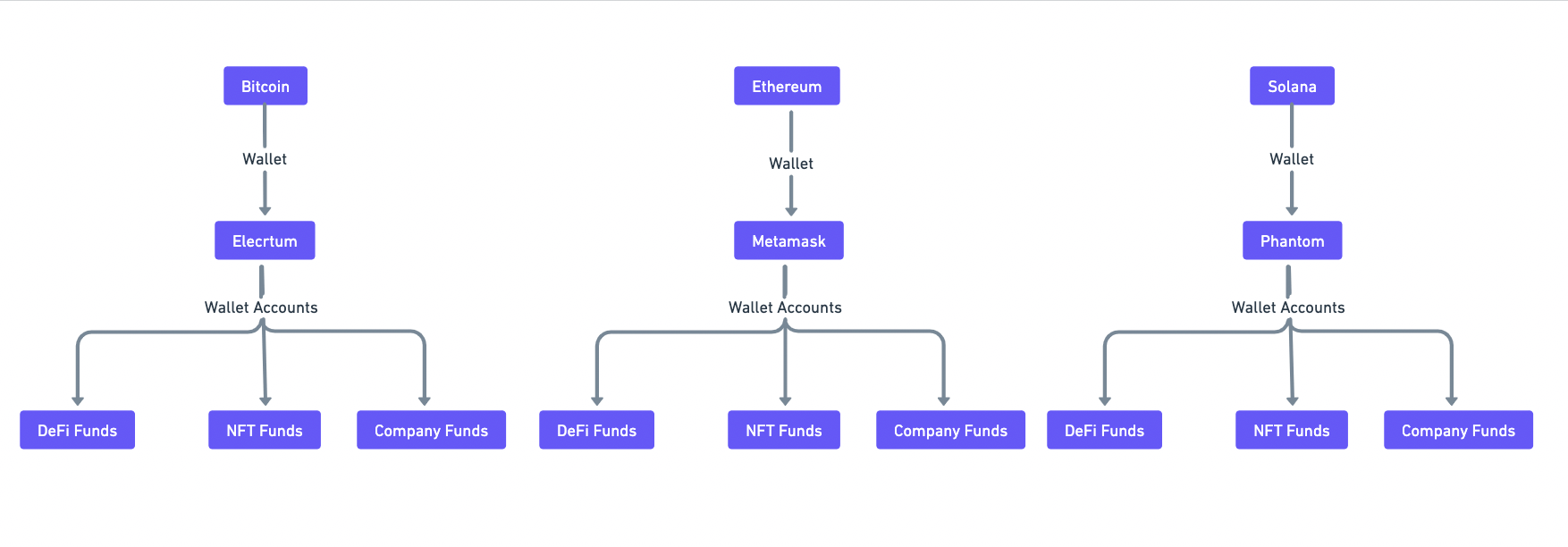
Cryptocurrency fund management is still in a naive stage. A user generally has multiple portfolios that they need to track. These can be Company funds, DeFi Investments, NFT Investments, Long Hodls, etc. But there seems to be no way a user can manage multiple portfolios from a single place.
This portfolio management issue gets even more serious when the user has to manage multiple portfolios over multiple blockchains, as every blockchain has its own set of tools like wallets and Dapps. At the end of the day, all these portfolios get intertwingled because of the lack of a centralized way to look at, track and manage these portfolios. There are some portfolio management tools for EVM chains but the issue remains for aggregating both EVM and non-EVM chains into one interface since for chains like Bitcoin it becomes too cumbersome for the user to input his newest address into the portfolio tracker.
Some users try to deal with the issue by creating multiple wallet accounts within their Metamask, Ledger, Trezor, etc., and using each of these single wallets as a separate portfolio. But as all these software and hardware wallets can store only one master seedphrase, things get even more complicated when the user needs to back up all their seedphrases individually. Losing any one seedphrase leads to lose of the entire fund kept in all the sub-wallet accounts.
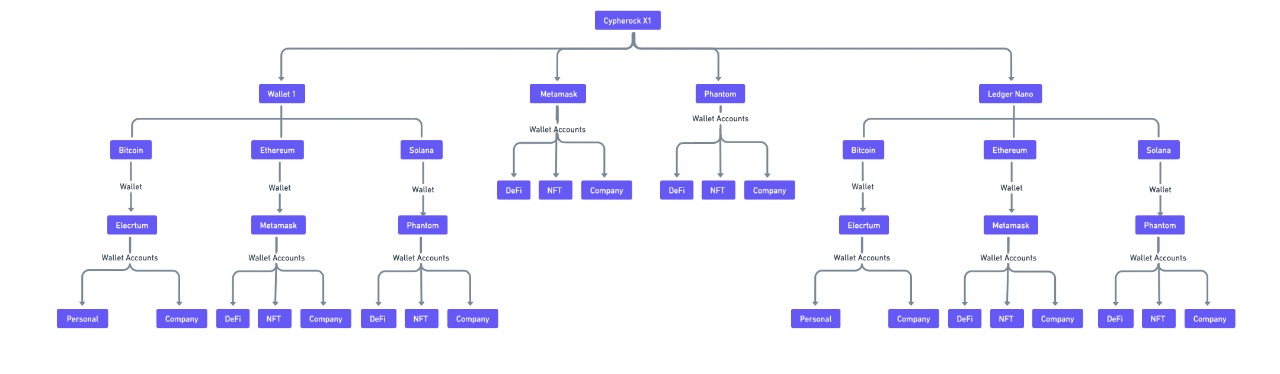
Cypherock X1 changes that. Cypherock X1 allows users to create up to four unique wallets completely segregated from each other. The segregation happens at such a fundamental level that each unique wallet has a separate seedphrase, thereby, acting as four completely unique hardware wallets in themselves. You can read more about it here -
Now, users currently use multiple hardware wallets to manage their portfolios like company funds, personal Hodl funds, DeFi Investments, and NFTs investments. Users can manage all these multichain portfolios from within Cysync App as a single master portfolio manager app.
## How to start using Cysync as an All-in-One Portfolio Manager
### Onboarding Wallets on Cypherock X1
#### **Generate new wallet**
Users can generate a new wallet within their X1 Vault without the need to create and store recovery phrases. As the wallet is automatically backed up in five shards while you generate the wallet. Tutorial:
#### **Import seed phrase**
Users can import seedphrases of their existing BIP-39-based software and hardware wallets like Metamask, Ledger, Phantom, Trezor, etc Tutorial:
By backing up your existing seedphrases you will be able to manage your funds from both your existing wallet and Cypherock X1. Also, you won’t be needed to secure the recovery phrases of your existing wallets anymore. This is possible because the recovery phrases are backed up in X1 Vault and X1 Cards, making the existing physical backup redundant. Moreover, all seedphrases are stored in the Cypherock X1 architecture and are distributed to prevent single-point-of-failure attacks.
#### Using X1 to manage your Portfolio
Each of the generated wallets and imported wallets is added in Cypherock X1 and their portfolios are together displayed on the Cysync App. All these wallets are completely segregated and can be used as individual portfolios also. All you need to do is to select the wallet portfolio you want to manage, in the ‘Wallets’ tab and complete your operation, these operations can be tracking portfolio, receiving assets, making transactions, etc. All operations logs are recorded separately for each wallet.
## Personas
### Web3 Founder
Web3 founders usually are in charge of keeping custody of company funds as well as their own personal funds. These lead to confusion and can cause funds to get meshed. To keep the funds independent, founders need to buy a new hardware wallet. To use those two hardware wallets, founders usually buy separate desktops because of being unable to use both of them over a single desktop.
With Cypherock X1, the process is as simple as buying an X1 and creating two unique wallets, setting up your Cysync, and using both the unique wallets as distinguished portfolios. Users can create sub-portfolios for further dividing their company funds into different sub-portfolios like Marketing funds, development funds, Legal funds,s, etc. Users can use all these sub-portfolios from within their main portfolio.
### Personal User
It is hard to keep your funds safe and independent of each other while using private wallets as a tool for self-custody. This leads to your portfolios like NFTs, DeFi, Trading & Hodling getting intertwingled. Unable to track your portfolios leads to mismanagement of your funds.
Moreover, with some wallets, users risk getting hacked by indulging in degen activities. In case, hackers are able to fetch private keys of the hacked wallet, these keys can potentially be used to decode keys for all other wallets. Leading to all their wallets being generated with a single seedphrase getting drained.
Cypherock X1, allows users to generate four unique wallets each with a unique master seedphrase, therefore, one wallet getting hacked doesn’t mean the other three get drained too, simply because they are sandboxed from one another.
# Download cySync
When you first receive your Cypherock X1, navigate to the Get Started page on the Cypherock website:
Only download cySync from the Cypherock website as downloading the software from any other source may expose you to hacks or scams.
Follow the steps mentioned within cySync to add your respective wallets and blockchain accounts with tokens and NFTs.
# Import Seed Phrase from existing BIP39 compatible wallet
Use Cypherock X1 to import an existing wallet and manage the wallet using the cySync App
Cypherock X1 enables you to create up to 4 independent wallets with 4 independent seed phrases. Therefore, you can import your existing seed phrase and secure your existing wallet, as well as transact from your existing wallet using Cypherock X1 and cySync. Here is a [video guide](https://www.youtube.com/watch?v=FGorVjaJ0eo\&list=PL0db5IfQ4iyriWCgby_rJKeG31BLoxW7k\&index=11) for the same.
### Step 1: Create Wallet
Plug in the Cypherock X1 Vault into your computer and choose the “Create Wallet” option on the X1 Vault.
### Step 2: Restore from Seed Phrase
Right-click on the joystick to navigate to “Restore From Seedphrase” option.
### Step 3: Create name for wallet
Set a name for your wallet. This name will also reflect on CySync once you have synced the wallet with CySync.
### Step 4: Setup PIN
You will be prompted with an option to set the PIN. For the utmost security, it is best to set a PIN.
Additionally, you will be prompted with a warning that if you forget your PIN, you will never be able to access the wallet. It is better to backup the PIN somewhere in case you feel you might forget it later. Even though the PIN may be exposed, in the case of an attack, the attacker will still need to gain physical access to 2 physical components.
### Step 5: Choose the length of your seed phrase
Depending on the wallet that you are securing with Cypherock you may have a 12/18/24 word seed phrase. You will have the option of choosing the length of the seed phrase to input into the X1 Vault.
### Step 6: Add your seed phrase
Depending on how long your seed phrase is, you will have to input your seed phrase into the X1 Vault. You will be prompted with the initial two letters of the word after which you can make the selection of the word.
Why is this possible? BIP39 uses a standard set of words that allow you to generate seed phrases. Please read [here](https://github.com/bitcoin/bips/blob/master/bip-0039/english.txt) for the full list of words in the BIP39 standard.
### Step 7: Verify seed phrase
You will be prompted by the X1 Vault to verify your seed phrase. Please ensure that the words that are selected are accurate to your current seed phrase backup and are in order.
### Step 8: Tap X1 cards to sync wallet
Please ensure that you have all 4 X1 cards available to complete the wallet setup. After verifying that your seed phrase is accurate, tap all 4 X1 cards with your X1 Vault.
### Step 9: Destroy seed phrase backup
Once you have verified that the wallet has been secured by Cypherock X1, you may now destroy your current seed phrase backup.
In the case that you want to view your seed phrase at any point in time in the future, you may do so from the wallet menu within the device under the section “View Seed”
# Generate a new wallet with Cypherock X1
Use Cypherock X1 to create a new wallet and manage the wallet using the cySync App
Cypherock X1 allows you to create a new wallet without the need to back up the seed phrase. The estimated time to setup is roughly 2 minutes. Here is a [video guide](https://youtu.be/dpIve2_i99o) for the same.
### Step 1: Create Wallet
Plug in the Cypherock X1 Vault into your computer and choose the “Create Wallet” option on the X1 Vault.
### Step 2: Generate new Wallet
Right-click on the joystick to navigate to “Generate new Wallet” option.
### Step 3: Create name for wallet
Setup a name for your wallet. This name will also reflect on CySync desktop app once you have synced the wallet with it.
### Step 4: Setup PIN
You will be prompted with an option to set the PIN. For the utmost security, it is best to set a PIN.
Additionally, you will be prompted with a warning that if you forget your PIN, you will never be able to access the wallet. It is better to back up the PIN somewhere in case you feel you might forget it later. Even though the PIN may be exposed, in the case of an attack, the attacker will still need to gain physical access to 2 physical components to be able to hack your assets.
### Step 5: Tap X1 cards to sync the wallet
Tap the 4 X1 cards to complete the wallet setup. You can proceed to sync the wallet with the cySync desktop app now.
# How Cypherock generates your 24-word seed phrase
Seed phrases, introduced by [BIP39](https://www.cypherock.com/blogs/post_what_is_bip39), are a recovery method that allows an individual to recover their assets in the case of loss of their crypto wallet, or any other case that would inhibit access to the wallet. The very first step in creating a seed phrase is to generate entropy. Entropy in the case of wallets is a large, random binary number that is generated. Entropy and randomness are synonymous in the sense that the more entropy that exists, the less predictable the seed phrase in eventuality is going to be. In the BIP39 standard, there are different lengths of seed phrases that can be generated, most commonly wallets generate 12/18/24 word seed phrases - each with their corresponding lengths of entropy in bits. For example, a 12-word seed phrase has 128 bits of entropy, whereas a 24-word seed phrase will have 256 bits of entropy. In a 24-word seed phrase, there are 2^256 combinations of seed phrases possible. In comparison, there are 2^166 atoms in the universe. So, guessing a 24-word seed phrase is next to impossible. It is due to this magnitude that Cypherock will always generate a 24-word seed phrase.
## How entropy is generated in Cypherock X1
Cypherock X1 generates 256-bit entropy by utilizing True Random Number Generators (TRNG) which are [FIPS](https://csrc.nist.gov/glossary/term/federal_information_processing_standard) compliant. The TRNG is built into the secure element of the device, as well as the MCU. For further clarification, Cypherock uses the following secure element and MCU respectively: ATECC608 and STM32L4. The secure element, alongside the MCU each generate 32 bytes (256 bits) of entropy which are then combined using the XOR method. The XOR method is a fail-safe designed to ensure that even if either of the components, the MCU or the secure element has a backdoor in their random number generation, the seed phrase generated will still be random, hence avoiding the single point of failure here as well. Normally, in other wallets, the output is stored in a single place - usually the secure element of the device. In Cypherock's case, once the entropy output of each of the chips is combined, Cypherock applies Shamir Secret Sharing at the entropy level to ensure that your seed phrase does not face a single point of failure.
## Shamir's Secret Sharing
Shamir's Secret Sharing (SSS) is a secret sharing mechanism for distributing private information into cryptographic parts such that a certain threshold of parts is required to recreate the secret. This is done to avoid any one party involved in the sharing scheme compromising the secret. Cypherock applies SSS at the entropy level during wallet creation. What this means is that the 256 bits of entropy are split into 5 cryptographic parts which are stored in the X1 Vault and the 4 X1 cards. A threshold of 2/5 is applied, meaning that any two - X1 card and X1 Vault, or 2 X1 cards - can be used in conjunction to reveal the secret, which in this case would be the seed phrase.
# Best practices in keeping your X1 cards secure
Seedphrases are the biggest pain point for self-custody crypto solutions as they pose the risk of having a single point of failure in the overall security framework. Seed phrases are traditionally secured on either paper or metal sheets and can be susceptible to damage or other risks such as spillage over the page, loss, and easily readable plain text for attackers to drain out your funds. Similarly, digital storage solutions like Google drive and screenshots on PC/Smartphones are susceptible to backup devices getting corrupted, lost, stolen, and hacked.
With Cypherock X1, seedphrase backups are a thing of the past. X1 removes all of your worries about backing up your seedphrase by sharding the private key, thereby, eliminating the need for any seed phrase backup whatsoever. Cypherock’s architecture allows you to protect your keys from the majority of attack vectors and you can take advantage of it by including these tips in your security framework.
# Use the protective card sleeves
Card Sleeve for X1 Cards
Cypherock provides RFID covers for all your cards in the product packaging itself. The main aim of these Protective Card Sleeves is to create a faraday cage - an enclosure designed to block electromagnetic fields which prevent any unauthorized remote scanning of your X1 Cards.
It is recommended to always keep your X1 Cards in these sleeves, especially if you manually opted out from creating a PIN for your wallet account. Keeping Cards without PIN and Card Sleeves can lead to unauthorized access to your X1 Cards.
# Geographical Seperation
To maximize security, the X1 Cards should be distributed geographically to prevent an attacker from obtaining any two Cryptographic parts and being able to access the assets secured by the wallet.
Crypto security is still in its nascent stage. As we develop our products, we try to balance convenience with the highest level of security possible. Security experts do not recommend breaking seedphrases into parts and storing them separately since if you lose any one of them and your Crypto assets become unaccessible from the leftover words of the seed phrase. Cypherock X1 cards help solve that problem and in fact, the further the cards are separated, the more secure your Crypto assets become. As further geographic separation helps add a layer of security by making it trickier for attackers to get hold of multiple Cryptographic parts.
Recommended temperature range of X1 cards: -20℃ to +50℃.
As with even your debit and credit cards, users are recommended to not keep X1 Cards exposed to sunlight for long durations. Currently, there is no optimal recommendation that Cypherock has for the management of the X1 Cards because each users' risk profile tends to vary. One common security scheme that we have come across is where the user keeps 1 X1 Card and the X1 Vault in a singular location where the X1 Card could be carried on the user's person, and the X1 Vault be stored in a safe location at home, and the remainder of the X1 Cards could be geographically located in 3 separate locations for example:
1. 1 X1 Card can be stored in a bank vault
2. 1 X1 Card can be given to a family member
3. 1 X1 Card can be handed to a friend
# Choosing your guardians
With Cypherock X1, you are empowered to safely share your X1 Cards with guardians without the fear of them being able to hack your funds. But at the same time, it is advisable to give custody to people who you trust.
Although selecting a guardian is a highly personal decision and varies from person to person, but it is recommended to keep the following in mind at the time of your decision-making.
* Trust-worthiness
* Accessibility
* Degree of Connection
Also, it is recommended, if you choose to give custody of your X1 Cards to human guardians, you do so only after setting up a PIN on the wallet. Cypherock has a three-layered security framework. These are Decentralized Keys, Distributed locations, and PINs. PIN/ passwords on your wallets act as the ultimate security layer which means, in case an attacker is able to find any two X1 cards, they still won’t be able to hack your Crypto assets until they know about your PIN. Cypherock architecture prevents brute-force attacks on Cypherock X1 by implementing an incremental wait time for wrong pin attempts. Brute-force attempts lock the wallets for up to 100 years.
# How do I know I am not locked-in to using only Cypherock X1
As mentioned previously, Cypherock X1 is [BIP39](/design-decisions/cypherock-is-bip39-compliant) compatible. Cypherock X1 not only allows you to import and manage existing seed phrases, but naturally will allow you to view the existing seed phrases of wallets generated within the X1 Vault, so that you have the choice to export the seed phrase if you so choose.
Before you view your seed phrase, you will need your X1 Vault alongside one of your X1 cards. Once you have to fetch them, follow these steps to view your seed phrase:
1. Select the wallet from the main menu
2. Click on the wallet and navigate to 'View Seed' in the menu
3. Enter the PIN that you have set for the wallet (if you have set a PIN). If you do not remember your PIN, you will not be able to view your seed phrase.
4. Tap any one of your X1 Card on the X1 Vault to view your seed phrase
Here is the [video guide](https://youtu.be/0W22TcY8MtQ?list=PL0db5IfQ4iyriWCgby_rJKeG31BLoxW7k) for the same.
# How do I know my Cypherock X1 is genuine?
Before shipping each device is provisioned with a unique set of private-public keys for both device and card authentication as well as for end-to-end encrypted NFC communication between the device and the card. Authentication is performed by verification of signatures generated by the private key in the hardware. Signature verification is performed by the server using the corresponding public key.
Secure device authentication is carried out in the following steps -
* Unique key pairs are generated via a common seed (see key derivation paths [here](https://github.com/Cypherock/x1_wallet_firmware/blob/main/docs/device_provision_auth.md#auth-and-nfc-pairing-key-derivation-))
* The device includes a secure chip ATECC608A for storing private keys and sensitive data. ATECC608A and the MCU share an IO\_PROTECTION key which is used to read/write data in encrypted form.
* After provisioning is complete, the sensitive data in ATECC is locked and prohibited for read.
* **During the provisioning process**, the private keys and NFC pairing keys are stored in the device, and its public key along with the device serial number is stored on the server for authentication at a later stage.
* **During the authentication process**, the private key is used to generate signatures on serial numbers and random data, which is then verified at the server using the corresponding public key
* Change in hardware i.e. the MCU or ATECC during transport to the user can be detected as the shared key won't match.
* On both MCU and ATECC, the IO\_PROTECTION key is read disabled so cannot be used to create clones.
To read more about the authentication process, refer to the device provision documentation on the [Cypherock Github](https://github.com/Cypherock/x1_wallet_firmware/blob/main/docs/device_provision_auth.md).
Secure card authentication is carried out in the following steps -
1. Each set of Cypherock X1 is provisioned with a unique set of public and private keys for device authentication and card authentication. These unique pairs are generated from a common seed via different derivation paths.
2. Therefore before shipping, each set of X1 cards is provisioned with a unique set of private keys for NFC card authentication, along with its derivation path. Correspondingly, the device is provisioned with the xpubs for verification of X1 cards.
3. During the card authentication, the X1 card signs a random message using its private key, and shares the signature along with the derivation path to the device. Since the device is provisioned with xpubs, it is able to generate the public key corresponding to the private key provisioned on the X1 card and verifies the signature of the random message.
4. Only if the message was signed correctly, the card is understood to be authenticated by the X1 Vault.
# Email 2FA for Product Authentication
The advent of cryptocurrencies and its auxiliary features such as self-custody has enabled individuals to gain freedom when it comes to the management of their money. Self-custody solutions grant the custodian financial sovereignty, but also leaves the individual exposed to various attacks that could result in a complete loss of funds. Typically, hardware wallets are known to be the safest self-custody option, but even hardware wallets tend to have vulnerabilities. This blog explores how malicious wallet companion applications can be used to steal digital assets from users.
## Malicious software as an attack vector
Typically, a hardware wallet connects to a desktop or a mobile application for various operations. Cypherock X1 comes with a cySync desktop application available across Windows, Linux and Mac. The application serves as the interface for all wallet operations, and the hardware tends to be treated as a signing device. Although the application is crucial in the functioning of the hardware wallet, the default assumption is not to trust the desktop application due to its nature of being installed on an internet-connected device that could host malicious programs. A common example of an exploit carried out by malicious software is through phishing, where the attacker attaches a download link after stating that either the wallet, or the software has suffered a breach, and a new application would need to be installed which would help reset the pin on your hardware wallet, or install the appropriate updates on your wallet. Once the malicious software has been downloaded, there may be prompts to enter the seed phrase of the wallet generated to access further functionality on the desktop application. Usually, there is no way for the attacker to extract the seed phrase from the wallet itself remotely, so it tends to be disguised as a part of the user flow to help keep your wallet safe. Hence if the user enters the seed phrase into the malicious application, it is safe to assume that the funds have been compromised.
To authenticate your hardware wallets today, hardware wallet companies broadly use two types of approaches today -
1. The secure chip inside the device authenticates the device on initialization. This is an insecure way to verify the device since the user cannot verify this on a compromised wallet.
2. The wallet on initialization is authenticated by the server of the company and the authenticity result is displayed by the companion app with the wallet. The problem here is if the user has a malicious app which is what the original threat model of the hardware wallet is, then the malicious app can display to the user that the product is authenticated even though the response from the server was different from that.
## Email Authentication Notification
To remove the reliance upon the desktop application as a singular source of truth for wallet authenticity, Cypherock has implemented an optional email-based 2FA system that also directly sends you the authenticity status of your X1 vault and X1 cards on your email. When you successfully complete a device or card authentication, you will receive an email from Cypherock with the authentication status about the same. Hence, even if the user is using a malicious desktop app, the user can double-check the authenticity result on their email. It is important though to make sure that the email the user receives is sent from the cypherock.com domain email address.
# How to recover your Crypto assets in the case of loss or theft
Assuming that all 5 cryptographic parts of the Cypherock X1 have not been compromised, here are some tutorials on how you can recover your Crypto assets, assuming you have the respective hardware components:
1. [Lost X1 Vault, but still have all X1 Cards in-tact](https://youtu.be/TlApEgDzsCQ)
2. [Lost 2 X1 Cards](https://youtu.be/8uZmJ-5r_-g)
3. [Lost X1 Vault, and up to 2 X1 Cards](https://youtu.be/wg-GD0I59CM)
# What happens to my Cypherock X1 if Cypherock goes out of business?
1. Cypherock X1 allows users to be able to view the seed phrase of any of the wallets that are currently being secured. Therefore, having the X1 Vault and any one of the X1 Cards in possession, a user can view the seed phrase and transfer assets to another Crypto wallet of their choosing, which is BIP39 compatible. Here is the [video guide ](https://youtu.be/0W22TcY8MtQ?list=PL0db5IfQ4iyriWCgby_rJKeG31BLoxW7k)for the same. To view the seed phrase, you don't even need to connect it to the cySync desktop app. You can view the seed phrase by connecting the device to a power bank as well.
2. In case Cypherock goes out of business and the user also breaks the X1 Vault, we will soon be releasing an open-source Android and IOS app that will allow the user to tap their X1 cards directly on an NFC-enabled smartphone to recover the seed phrase by entering the PIN and using any 2 X1 cards. Here is a [prototype video](https://www.youtube.com/watch?v=k0MuyWUi2PY) of the same.